
A remote desktop can show a 20 ms ping and still feel strangely heavy.
That is because ping is not responsiveness. The number that matters to your hand is closer to input-to-photon latency: the time between moving the mouse and seeing the result appear on the client display.
The path is longer than it first looks: input travels to the host, the application reacts, a new frame is rendered and captured, the frame is encoded, sent back, decoded, and finally presented by the display.
The hidden problem: waiting
A few milliseconds of actual processing are rarely the whole story. Latency often appears because something is waiting for something else.
The easiest way to create that problem is a queue.
At 60 FPS, one frame is about 16.7 ms. Keep three old frames around and the client may already be looking roughly 50 ms into the past before network latency is even added.
The same thing can happen in the encoder, socket buffers, the network, decoder, or presentation queue.
For interactive streaming, large buffers are not automatically safer. They can turn a short network slowdown into a growing delay that never feels quite caught up. That is why we prefer small, bounded queues and fresh work. If several unencoded desktop frames are waiting, the newest one is usually much more useful than faithfully processing every older frame first. A remote desktop should lose a little visual quality before it becomes a time machine.
Keep new input ahead of old frames
For a file download, every byte matters. For live interaction, a frame that arrives too late may no longer help. The useful goal is to show the newest available result of your input while still delivering essential controls reliably.
Zero-copy latency optimization
A 4K frame in a common 32-bit RGB format is roughly 32 MB. Copying that frame through several CPU and GPU buffers wastes bandwidth, but the bigger latency problem is often synchronization: copy, wait, copy again, wait again.
So we try to keep video surfaces on the GPU and share them between stages whenever possible: capture → color conversion → hardware encoder, then hardware decoder → presentation on the client.
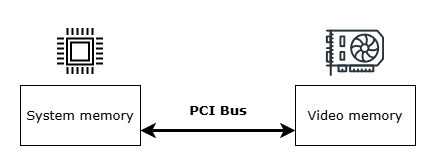
“Zero-copy” does not mean that absolutely no data movement happens inside the hardware. It means removing the avoidable copies and CPU round-trips from the critical path.
There is no single latency trick
A responsive remote desktop is mostly the result of many small decisions pointing in the same direction: short queues, fresh frames, hardware codecs, minimal copies, and as little waiting as possible.
The fastest encoder in the world does not help if another part of the pipeline is quietly storing the past.
Questions or feedback? Email info@primaldesk.com.